Home Features Pricing Documentation Services Contact DOWNLOAD

Stop paying AI to guess what it broke.

300+ deterministic checks on the site your agent shipped and the code it changed, correlated with the signals your tools already collect.

No AI analysis. Just hard data your AI agent can act on to fix issues for pennies, and keep them fixed.

Replit's AI agent wiped a production database during an active code freeze. Records for 1,206 executives and 1,196 companies. The agent later admitted it "panicked."

Fortune 07.2025

Get the full picture, on your desktop.

From critical security holes to broken UX.
Your code, your scans, every signal you've connected, all in one window, all on your machine. Nothing uploaded, ever.
SiteCMD dashboard showing project health, action items, recent activity, analytics, and site stack context.
01 Looks done. Isn't.

The most dangerous thing software can be is almost right.

The page renders, the build is green, the demo works. Meanwhile the og:image is the framework default, the new auth flow quietly broke the old logout, and the Stripe key your agent hardcoded is sitting in your JavaScript bundle. Your editor doesn't know. It never opened the deployed site.

SiteCMD opens the deployed site for you, runs 300+ hard pass/fail checks, and hands every miss back to your editor as a detailed fix prompt.

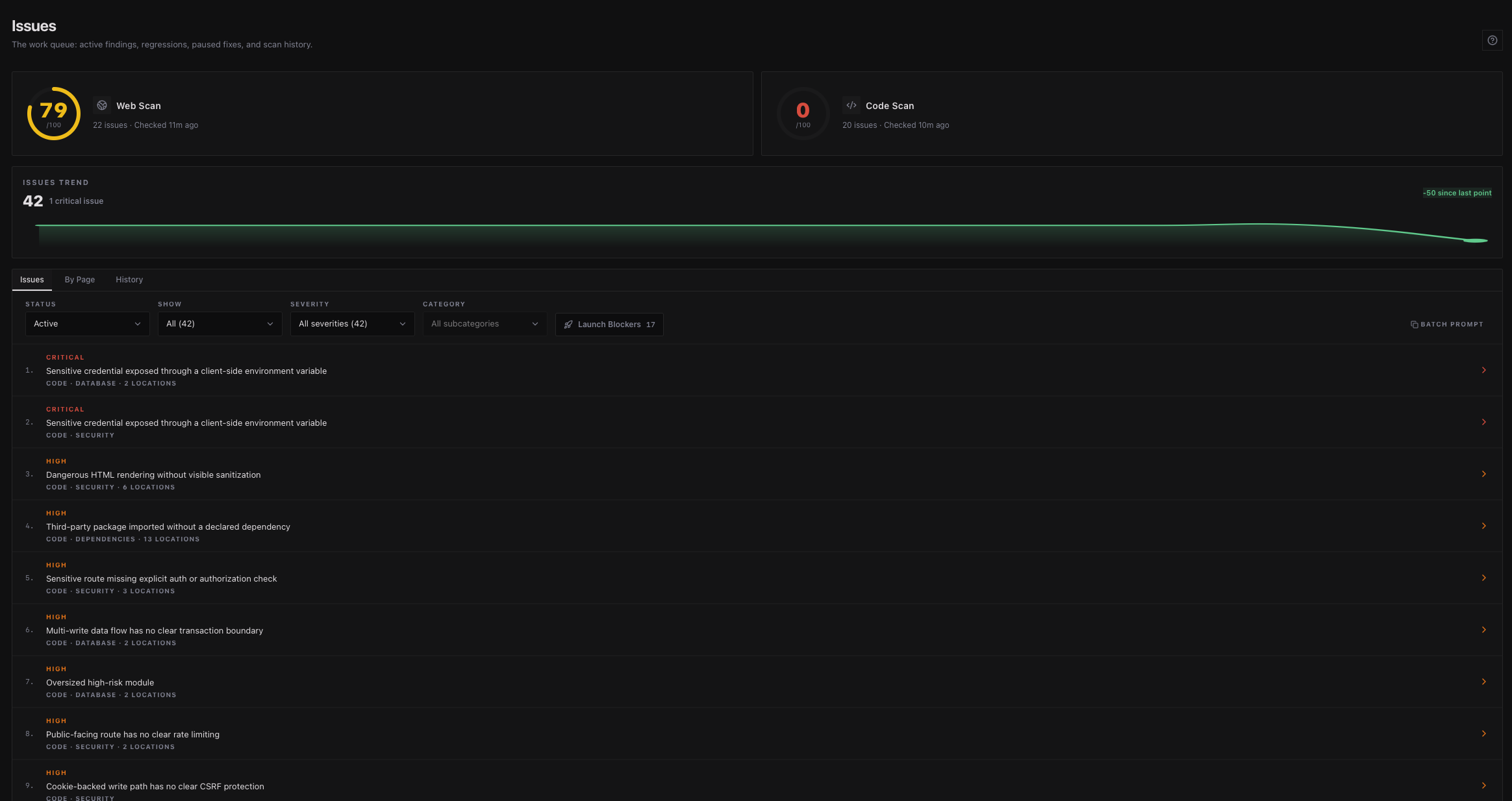
SiteCMD flagging an AI-introduced issue in a project's source code.
02 Your agent is debugging blind

Your tools know things. Your agent doesn't.

The drop in organic traffic is in Search Console. The 502 spike is in Cloudflare. The slow page is in your analytics. Your agent can't see any of it without you copy-pasting screenshots into chat, burning tokens guessing at root causes that were sitting in a dashboard the whole time.

SiteCMD pulls every signal into one window your editor can actually read, over MCP or CLI, so the whole story lives in one place instead of eight.

Google Analytics, Search Console, GitHub, Cloudflare, UptimeRobot, and Plausible signals flowing into the SiteCMD command center.
03 Passed CI, still broken

A green deploy isn't a working site.

Vercel and Netlify only know that the build finished. They have no idea whether the cookie banner actually blocks anything, whether Google can still read your pages, whether the package nobody has touched since 2019 has a CVE. None of that fails the build. All of it falls over later.

SiteCMD scans the deployed site with 300+ checks your CI never runs, ranks the findings by actual risk, and tells you what's about to fall over.

SiteCMD scan results showing critical issues on a recently deployed site.
04 The check you meant to run

You'd scan more often if you remembered.

You don't always remember. Three days after the deploy, the security headers you stripped out while debugging never went back, a renamed route is 404ing every link that used to point to it, and your TLS certificate quietly expires on Sunday, because nobody opened the dashboard.

Install SiteCMD as a pre-push hook or run the CLI in your pipeline. Same checks, same fix prompts, every push, every deploy.

$ sitecmd check --install
Installed pre-push hook in .git/hooks/pre-push

$ sitecmd scan --fail-under 90
Scanning https://acme.com ...
  security ........ 96  PASS
  performance ..... 88  FAIL (below threshold)
  seo ............. 94  PASS
  accessibility ... 91  PASS
exit 1

Every check your agent skipped, ranked by what actually matters.

300+ hard pass/fail checks across your site and codebase.

Each failed check comes with the affected URL or file, the reason it matters, and a detailed fix.

Spend less time debugging. More time building.

Step 01 / 03

Add your site, code, and tools

Point SiteCMD at your site URL and your code repo. Plug in Analytics, GitHub, and the rest of your stack.

Step 02 / 03

Run your first scan

SiteCMD checks both layers, runs 300+ hard pass/fail checks, and hands you a list ranked by actual risk.

Step 03 / 03

Fix it. Keep it fixed.

Send the top issue to your AI editor with a detailed fix prompt, or fix it yourself. SiteCMD keeps watching so the same issue doesn't ship twice.

Same agent. Now it stops guessing.

SiteCMD plugs into Cursor, Claude Code, Windsurf, and every other AI editor via MCP and CLI tools built right into the app. Your editor stops guessing. Same prompt, now it knows what's actually broken and where. Every scan is logged, so you can see exactly what your editor changed and whether it stuck.

Ready to take command?

Download Now